Submit Tool β†’ ⭐Write Review β†’
TECH TURF EDITORIAL & AI INSIGHTS

Business Technology Articles & Guides

In-depth software benchmarks, AI workflow tutorials, enterprise asset tracking insights, and expert reviews curated by the Tech Turf research team.

LATEST PUBLICATIONS

Recent Articles & Deep Dives

Sponsored
Advertisement
Sponsored

Category: Business Technology

Get here complete information about latest technologies that are being used in business. Get news of new innovations for your business.

  • Fleet Asset Tracking Software for Management in 2026

    Fleet Asset Tracking Software for Management in 2026

    Fleet Asset Tracking Software for Management: Fleet asset management is the process of managing a fleet of vehicles or other assets used in transportation, logistics, or other industries. This process involves various activities such as acquisition, maintenance, repair, replacement, and disposal of fleet assets. Fleet Asset Tracking Software is a very big technology innovation in Business world.

    What is Fleet asset management software?

    Fleet asset management software is a type of software designed to help organizations manage their fleet of vehicles and other assets more efficiently and effectively. This software can help organizations with tasks such as acquisition, maintenance, repair, replacement, and disposal of fleet assets.

    The goal of fleet asset management is to maximize the efficiency and productivity of a fleet, while minimizing costs and risks. This can be achieved by optimizing the use of assets, reducing downtime, improving safety and compliance, and enhancing the overall performance of the fleet.

    Fleet asset management software typically includes a range of features and functionalities that can help organizations track and manage their fleet assets more effectively. There are various functionalities that can performed by fleet asset tracking software such as Vehicle tracking and monitoring, Maintenance and repair scheduling, Driver management, Inventory management, Reporting and analytics etc.

    Source: https://www.informsinc.com/solutions/fleet-and-asset-management-software

    What are the Examples of Fleet assets to track?

    There are various types of fleet assets that organizations may need to track and manage, depending on their specific industry and operational needs. Some of the most common fleet assets that organizations may need to manage are mentioned below.

    Vehicles

    Vehicles are an integral part of transportation and logistics. They can include cars, trucks, vans, buses, and other types of motorized vehicles. These vehicles are used for commuting to work, transporting goods across the state or country, and shipping items around the world.

    Equipment

    Equipment plays an important role in many industries today. Specialized equipment, such as forklifts, cranes, and other types of heavy machinery are essential for the efficient running of construction, mining, and agriculture businesses.

    Trailers

    Trailers are used for the transportation of goods, equipment, or other assets across long distances. From large commercial entities to small businesses and individuals, trailers provide an efficient way to move items from one place to another.

    Containers

    Containers have become an integral part of global trade, with millions of them being used to move goods around the world every year. Shipping containers are the most common type, and are widely used for transporting goods by sea, rail, and truck.

    Tools

    There can be variety of tools such as hand tools such as wrenches and screwdrivers, as well as power tools like drills, saws, and sanders. Additionally, other types of equipment can be employed for specialized tasks, such as jacks for lifting heavy vehicles or welding equipment for metal repairs.

    When managing these fleet assets, organizations need to track various types of data and information, such as the asset’s location, maintenance schedule, usage patterns, and cost of ownership. Fleet asset management software can help organizations track and manage this data more effectively, ensuring that fleet assets are properly maintained, utilized, and replaced as needed to maximize efficiency and productivity.

    Learn more about Top Fleet Asset Tracking Software Providers in 2026


  • IT Asset Tracking Software & Management in 2026

    IT Asset Tracking Software & Management in 2026

    IT Asset Tracking Software: IT asset tracking is the process of monitoring and managing an organization’s IT assets throughout their lifecycle. Everything relevant to deployment, upkeep, upgrades, and disposal is included in this.

    What is IT asset tracking software?

    IT asset tracking software is a specialized tool used to manage and monitor an organization’s IT assets throughout their lifecycle. Its intent is to offer business assistance to firms so that they can improve their productivity, decrease risks, and better manage their IT inventory.

    IT asset tracking software can be used to manage a wide range of IT assets, including hardware devices, software licenses, digital files, and other related components. The software typically provides a centralized database that allows users to track the location, usage, and maintenance history of each asset, as well as information such as warranty details, purchase dates, and depreciation.

    IT asset tracking software can perform Asset discovery. it automatically scans the network to identify new devices and assets and adds them to the asset inventory. It is also providing a centralized database to manage and track all IT assets, including their status, location, and other important details.

    IT asset tracking software can also perform asset monitoring. It allows users to track the movement and usage of assets in real-time, including who has the asset, when it was last used, and when it needs to be replaced or upgraded.

    This software is very helpful in reporting and analytics because it Generates reports and analytics on asset usage, performance, and costs, allowing organizations to make informed decisions about their IT infrastructure. it also Can integrate with other IT systems, such as helpdesk and procurement systems, to provide a complete view of the organization’s IT assets and operations.

    What are the examples of IT Assets for tracking?

    IT assets can include hardware devices such as computers, servers, printers, and mobile devices, as well as software licenses, digital files, and other related components. By keeping track of IT assets, organizations can improve their IT infrastructure, reduce costs, minimize risks, and increase efficiency.

    There are many different types of IT assets that can be tracked using IT asset tracking software. below are some examples of IT assets.

    Hardware Devices

    Hardware devices are essential components of any network. They are physical devices, such as desktop computers, laptops, servers, printers, routers, switches, and mobile devices that enable data to be transferred and accessed.

    Software Licenses

    IT asset tracking software can track software licenses and ensure that the organization is in compliance with licensing agreements. It can also track the usage of software licenses to optimize license utilization and reduce costs.

    Digital Files

    Digital Files means digital documents, images, videos, and other media files that are used in the organization. IT asset tracking software can track the location and usage of these files and ensure that they are secure.

    IT Infrastructure Components

    All components that make up the IT infrastructure, such as cables, connectors, power supplies, and other related equipment comes under IT Infrastructure Components.

    Cloud Assets

    IT asset tracking software can track cloud assets i.e. virtual machines, storage, and other cloud-based resources.

    IT asset tracking software can help organizations keep track of all their IT assets, including both physical and digital assets, ensuring that they are utilized effectively, are compliant with regulations and licenses, and are secure.

    Also Check….

    Know about top 5 IT Asset Tracking Software Companies in 2026


  • Fixed Asset Tracking Software | Fix Asset Example in 2026

    Fixed Asset Tracking Software | Fix Asset Example in 2026

    Fixed Asset Tracking Software: Fixed asset tracking is the process of monitoring and managing the physical assets that are owned by a company or organization. These assets are typically long-term investments, such as buildings, equipment, machinery, and vehicles that are used in day-to-day business operations.

    Fixed asset tracking allows organizations to keep track of their assets’ locations, maintenance schedules, depreciation, and other important information. By doing so, businesses can ensure that their assets are being used effectively, reduce the risk of theft or loss, and make informed decisions about asset maintenance and replacement.

    What is Fixed asset tracking software?

    Fixed asset tracking software is a type of software that is used to monitor and manage fixed assets owned by an organization. This software helps organizations track and maintain their assets, providing a centralized database of asset information that can be accessed by authorized personnel.

    Fixed asset tracking software typically includes features such as:

    Asset inventory management

    By utilizing this type of management system, organizations can easily keep track of the location, condition, purchase date, and maintenance history of all their fixed assets. This provides them with an accurate picture of the overall value of their assets and allows them to better manage their resources and maintain a healthy financial status.

    Depreciation calculation

    This makes it easier for businesses to accurately report financial data, eliminating manual calculations and reducing the risk of errors. The software also simplifies the process of filing taxes, ensuring that all related information is up-to-date and accurate.

    Maintenance scheduling

    It can schedule maintenance tasks and track maintenance history, allowing users to stay organized and informed about their asset maintenance needs. Additionally, it can send alerts when maintenance is due, so users can ensure their assets are always running smoothly and efficiently.

    Reporting

    It can generate reports on asset utilization, maintenance costs, and other key metrics that can help businesses make informed decisions.

    Organizations can choose to deploy fixed asset tracking software either on-premises or in the cloud, based on their specific requirements and preferences. Some software may also include mobile apps or other features that allow users to track assets remotely.

    Source: https://www.ibm.com/topics/fixed-asset-management

    What are the examples of fixed assets owned by an organization?

    Fixed assets are vital long-term investments for organizations, as they are utilized to generate revenue and support daily operations. Here are some examples of fixed assets that an organization might own.

    Buildings: It consists of offices, factories, warehouses, and any other structures that the organization owns.

    Equipment: It consists of machinery, tools, and other equipment used in manufacturing, construction, or other operations.

    Vehicles: It consists of company-owned cars, trucks, and other vehicles used for transportation or delivery.

    Furniture and fixtures: It consists of desks, chairs, shelves, and other items used in offices or other workspaces.

    Computer hardware: It consists of servers, workstations, laptops, and other computer equipment used by the organization.

    Land: It consists of any land that the organization owns, whether it is being used for operations or held for future development.

    Intellectual property: It consists of patents, trademarks, copyrights, and other intangible assets that the organization owns.

    Infrastructure: It consists of roads, bridges, and other public works that are owned by the organization.

    These are just a few examples of the fixed assets that an organization might own. Fixed assets can vary widely depending on the industry and nature of the business.

    Top 5 Fixed Asset Tracking Software in 2026

    Following are the top five fixed asset tracking software in 2026. this list is made by the research team of Tech – Turf. But we do not claim it to be accurate. ranking may vary with time.

    If you have liked the information in this post, then please share it with your friends on social media websites.

  • Military Asset Tracking Software in 2026

    Military Asset Tracking Software in 2026

    Military Asset Tracking SoftwareΒ in 2026: Military asset tracking is the process of monitoring and managing military assets, which can include equipment, vehicles, weapons, and personnel. It involves using various technologies and systems to collect, process, and analyze data related to the location, status, and movements of military assets.

    The goal of military asset tracking is to improve operational efficiency, situational awareness, and overall effectiveness of military operations. By tracking military assets, military commanders can make better decisions, optimize resource allocation, and enhance the safety and security of military personnel.

    There are various technologies used in military asset tracking, including GPS, RFID, barcoding, and satellite communications. These technologies are often integrated with military command and control systems, such as situational awareness software and logistics management platforms, to provide a comprehensive view of the military assets in real-time.

    Source: https://en.wikipedia.org/wiki/Military_asset

    What is military asset tracking software?

    Military asset tracking software is a specialized software application designed to help military organizations manage and track their assets. It is a type of enterprise resource planning (ERP) software that is tailored to meet the specific needs of military operations.

    Military asset tracking software typically includes features such as real-time tracking and monitoring of assets, inventory management, maintenance and repair tracking, and logistics management. It also provides a centralized database of all military assets and allows for the efficient allocation and deployment of resources.

    This software can be used for a wide range of military assets, including vehicles, weapons, equipment, and personnel. It can integrate with other military systems and platforms, such as command and control systems, situational awareness software, and logistics management platforms, to provide a comprehensive view of military assets in real-time.

    Some military asset tracking software may also include advanced features such as predictive maintenance, automated workflows, and analytics and reporting tools, which can help military organizations optimize their operations and improve decision-making processes.

    What are the uses of Military Base Asset Tracking software?

    Military Base Asset Tracking software has many uses, including:

    Asset Tracking

    Military Asset Tracking software providing comprehensive tracking and management of all types of assets. It allows users to create a centralized database where all asset information can be recorded, including details about vehicles, weapons, equipment and personnel. With this level of visibility into every asset, military personnel can easily locate and access information quickly when needed, ensuring a high level of operational efficiency.

    Inventory Management

    Military bases often have to manage a large amount of inventory, and this can be time-consuming and complex. With the correct software, they can easily monitor their usage rates and optimize their procurement and restocking processes when needed. This software helps military bases to stay on top of their inventory levels, allowing them to ensure they have the resources they need when they need them.

    Maintenance and Repair

    The software is designed to provide an efficient and streamlined approach to asset maintenance. It can track the repair and maintenance history of assets, allowing users to keep an eye on their performance over time. Additionally, it can schedule maintenance tasks, helping users stay on top of servicing and repairs, as well as automate maintenance workflows to reduce downtime and extend the lifespan of assets.

    Security and Accountability

    The use of software to track the movement of assets is invaluable. It provides enhanced security and accountability by enabling military to monitor their assets, ensuring they are used for their intended purposes. With such a system in place, military can rest assured that all assets are being used as intended, and any suspicious or unauthorized activities can be detected quickly.

    Resource Allocation

    It can provide real-time data on asset availability and usage, allowing for more efficient allocation of personnel and equipment. This will enable bases to maximize their utilization of available resources, ensuring that they are efficiently employed in order to meet mission objectives.

    Overall, Military Base Asset Tracking software can help military bases improve operational efficiency, reduce costs, increase asset lifespan, and enhance security and accountability.

    Top 5 Military Asset Tracking Software in 2026

    Following are the top five military asset tracking software providers. This ranking is created by Tech Turf research team. we do not claim it to be accurate.

    We hope that you have liked this post and will share it on social media websites.

  • Asset Tracking Software Management, Uses & Types (2026 Update)

    Asset Tracking Software Management, Uses & Types (2026 Update)

    Asset Tracking Software Management, Uses & Types in 2026: Asset tracking refers to the systematic process of tracking and managing a company’s physical assets. This involves the latest use of technology, such as RFID, GPS, or barcode scanning, to monitor the location, status, and usage of assets in real-time. The primary goal of asset tracking is to improve efficiency, reduce costs, and increase accountability by providing organizations with a complete view of their assets and how they are being used.

    Asset tracking can be used for a variety of purposes, such as inventory management, maintenance scheduling, and theft prevention. It is commonly used in industries such as manufacturing, healthcare, logistics, and construction, where physical assets play a critical role in day-to-day operations. By tracking assets, organizations can reduce downtime, minimize the risk of equipment failure, and improve overall productivity.

    What Does Asset Tracking Software Mean?

    Asset tracking software is a dedicated software solution that empowers organizations to track and manage their physical assets, including IT assets, equipment, vehicles, and tools. The software utilizes various technologies like barcode scanning, RFID, GPS, and sensors to track and monitor the location, status, and usage of assets in real-time.

    Asset tracking software offers a centralized platform to manage asset data, including asset history, maintenance records, and financial information. The software helps organizations to optimize asset utilization, improve maintenance schedules, and prevent theft and loss of assets.

    Asset tracking software classification

    Asset tracking software is customizable to meet the distinct requirements of various industries, including healthcare, logistics, construction, manufacturing, and education. The software helps organizations to streamline their operations, reduce costs, and increase overall efficiency by providing valuable insights into asset utilization and maintenance.

    Source: https://en.wikipedia.org/wiki/Asset_tracking

    What is asset tracking management & its Uses?

    Asset tracking management is the process of managing an organization’s physical assets using asset tracking software. It involves the use of technology, such as barcode scanning, RFID, GPS, or sensors, to monitor and track the location, status, and usage of assets in real-time.

    Asset tracking software managementdiagram

    Asset tracking management typically involves the following steps:

    Asset registration

    Asset registration is a key step in efficient asset management. It involves creating an asset database that includes details such as unique identification numbers, descriptions, locations and purchase prices of each asset. This helps to keep track of assets and facilitate seamless tracking of their movements within the organization.

    Asset tracking

    Asset tracking utilizes advanced technology to keep track of the real-time location, status, and usage of assets. This data is typically stored in an asset database so that it can be easily accessed and monitored. Asset tracking is beneficial as it allows companies to monitor their assets and ensure they are being used efficiently and effectively.

    Maintenance management

    Maintenance management is essential for keeping all assets maintained and in good condition. It involves using asset tracking software to plan and carry out maintenance activities, such as repairs, inspections, and replacements. This helps to ensure that assets are maintained according to the organization’s standards, reducing the risk of unexpected breakdowns or damages. Furthermore, effective maintenance management can lower operational costs by ensuring that all parts and components are functioning properly, extending their lifetime and eliminating the need for regular replacements.

    Reporting and analysis

    Reporting and analysis is a crucial part of asset tracking software usage. This involves using the software to generate reports and analyze data to identify areas that would benefit from improvement. These include optimizing asset utilization, reducing maintenance costs, and preventing theft or loss of assets. All of these measures can help save money and ensure the safekeeping of all assets.

    Asset tracking management helps organizations to optimize their asset utilization, reduce costs, and increase overall efficiency by providing valuable insights into asset usage and maintenance.

    What are the different types of asset tracking software?

    There are various types of asset tracking software available in the market, each designed to suit different types of assets and industries. Here are some common types of asset tracking software:

    Top 5 Asset Tracking Software in 2026

    Following are the best Asset tracking software in 2026, Tech Turf made this ranking on its research but do not claim to be accurate. All the information is available in public domain.

    Source: https://www.forbes.com/advisor/business/software/best-asset-tracking-software

    We hope that you have liked this information and will share this on social media websites. If you need Asset tracking software with discount from top companies, please contact us using contact form.

  • Paper Document transaction Vs. Electronic Data Interchange

    Paper Document transaction Vs. Electronic Data Interchange

    Tech Turf is presenting here the article that will tell you the difference and similarities between theΒ Paper Document transaction and Electronic Data Interchange. You will get here the answers for, how Paper Document transaction and EDI is different and howΒ Paper Document transaction and EDI is similar.

    EDI Meaning

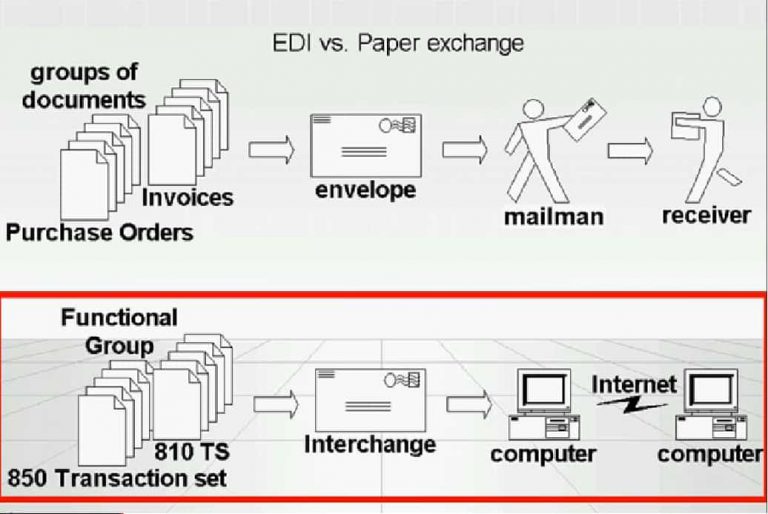
    EDI was designed as much to be as an electronic replica or mirror off a paper document transaction. The paper documents or forms are called transaction sets in EDI and how the documents are arranged and grouped by their departments is equivalent to how the functional group segments separate the transaction sets by their functions.

    Electronic Data Interchange Vs. Paper Exchange
    Electronic Data Interchange Vs. Paper Exchange

    The paper envelope that encloses the documents is equivalent to the interchange segment that encloses the group of transaction sets and the person sending the mail and the one receiving it would be equivalent to a computer sending an EDI file and a computer receiving it. remember that EDI is the exchange of electronic files between computers.

    Complete Electronic Data Interchange

    Comparison of a Paper Envelope to The Interchange Segment (ISA)

    While an envelope has a post-office mailing addresses on it, the interchange segment has the senders and receivers electronic IDs in it.

    Similar to how you would arrange the paper documents by grouping them by their departments that would process them. for example purchase orders are grouped together so that they get sent to the accounts payable Department, while the invoices go to the accounts receivable Department. EDI interchange have the functional group so as to group the transaction sets by their functions. the GS or functional group header segment denotes the start of a group of transaction sets the GE or functional group trailing segment denotes the end of the group. note that the GE segment has the count number of transaction sets that were enclosed in the group. example, 3 purchase orders one invoice. it also has a control number of the GS segment.

    EDI 850 Implementation

    Thanks

  • EDI Standard, Transaction Sets Data Segment| EDI 850 Implementation

    EDI Standard, Transaction Sets Data Segment| EDI 850 Implementation

    In this Article, we will cover the basics of EDI, you will get to its x12 format, its transaction sets, its data segments, elements and loops then finally the implementation guideline.

    Meaning of EDI

    Advantages of Using EDI

    Following are Two main advantages of Electronic data interchange.

    • Easy to manage huge volumes of transactions at minimal operating cost.
    • Eliminate mailing delays and data entry errors.

    EDI Process

    There are two well-defined processes in EDI.

    • Outbound process
    • Inbound process
    EDI Process - inbound and outboud
    EDI Process – inbound and outbound

    The outbound process is, when an EDI file gets generated from data out of an existing system and then sent to a trading partner.

    Inbound process is, when an EDI file is received from a trading partner and its data gets parsed and mapped into an existing system.

    Complete Electronic Data Interchange Knowledge

    EDI Format

    EDI format
    EDI format
    EDI Segment Terminators
    EDI Segment Terminators
    edi element terminators
    EDI element terminators
    edi data segments
    EDI data segments
    edi data elements
    EDI data elements

    let us now take a closer look at the EDI format. in here we have a sample EDI X – a file as you can see, it is quite cryptic but remember it was designed for a computer to process and not for us to read. The EDI format is made up of data segments. separated by segments terminators, the data segments are made up of data elements separated by element terminators.

    Comparison of a Paper Envelope to The Interchange Segment (ISA)

    Order of EDI x12 Standard Segments

    So the order of the EDI x12 segments goes as follows.

    The interchange segments encloses the functional group segments that in turn encloses the transaction set segments.

    Order of the EDI x12 Format
    Order of the EDI x12 Format

    EDI Transaction Sets, Data Segments & Data Elements

    A transaction set is basically the document itself. it is made up of data segments and these data segments are sectioned into areas or tables. the heading is area one or table one, the detail is area two or Table two, the summary is area three or Table three. not all transaction sets have all three areas and in fact many do not have the summary section.

    Transaction sets are made up of data segments and in turn the data segments are made up of data elements. in this example we have four data elements that are separated by element terminators. element terminators can be of any character but the asterisk is commonly used.

    EDI Data Segment, Data Elements and terminators
    EDI Data Segment, Data Elements and terminators

    At the end of a data segment is the segment Terminator. segment terminators can be of any character or string in this example we use the tilde. some data elements are qualifiers, they hold codes that will describe the values of data elements after them. in this example we have BT that tells us that the element is a bill to company.

    The nine tells us that the company ID is using the DUNS identification code. if we were to view a segment as a sentence and the n1 segment would say the bill to company name is ABC Inc with the DUNS ID of one, two, three, four, five, six, seven.

    EDI n1 segment viewed in efilemanager
    EDI n1 segment viewed in efilemanager

    Some view data segments to be like records and their data elements to be like fields. data segments can be viewed better by using the EDI-dev efilemanager. in here we have a section that displays the same in one segment. note how the descriptions of the codes are displayed next to them.

    EDI loops

    Sometimes Data segments have to be read together to obtain the correct information that is when we use EDI loops to denote such relations. EDI loops are used to keep related segments together, so that together they can convey the correct information. loops also make possible to repeat a group of related segments. in our example we have the n1, n2, n3 and n4 segments in a loop. note how the segment’s depend on each other. here the n3 segment with the street address value does not make sense without the n1 segment telling us that it is a street address of the bill to company.

    EDI loops
    EDI loops

    This example also shows how the loop is used twice to hold two different information of similar format. the first loop holds the billed to address while the second loop holds the ship to address.

    The EDI X12 Standard

    Even though it is the standard still has many version and transaction sets, the users have to be aware of so as to exchange EDI files successfully. the version number is indicated by its first three digits, the last digit indicates a release. here, the 40 10 and the 40 20 would indicate a major release and the 40 12 would indicate an interim release. changes in their interim releases are included in the next version therefore version 4020 would include the changes that are in the 4012 release.

    EDI X12 Versions and Transaction Sets
    EDI X12 Versions and Transaction Sets
    EDI transaction set version located in GS Segment
    EDI transaction set version located in GS Segment

    The version of a transaction set in an EDI x12 file can be found in the 8th data element of the functional group or GS segment. even when using the same versions of transaction sets, there are still differences in how companies would use them. for example, some data segments and elements may be omitted or the number of times the loop can be used is limited or some code values of an element restricted.

    EDI Implementation Guideline

    All these rules would be noted in an EDI Implementation guideline.

    850 set edi implementation guideline
    850 set EDI implementation guideline

    here’s an example of an 850 transaction set guideline for a particular company. note that only the segment’s that are being used in the transaction set are displayed and in the required column a data segment that must be used is indicated with an M for mandatory, an O indicates that the segment is optional. the maximum column indicates the maximum number of times the segment can be used.

    The ref segment can be used at most two times, the repeat column denotes the maximum times a loop can be repeated. here, the n1 loop can be repeated at most four times.

    EDI Transaction Set Header
    EDI Transaction Set Header

    The implementation guideline also has a detailed section for each segment which shows the requirements for each of its elements. in this example we have the ST segment that has two data elements. the first element is allowed to have only the value 850. it is a required element with the length of exactly three characters. the second element should hold a control number for the transaction set, it too is required with a minimum length of four and a maximum length of nine characters.

    EDI beginning segment
    EDI beginning segment

    let us take another example the Beg segment that uses only four of its 12 data elements. the four elements use have the position numbers 1, 2, 3 and 5. The first data element indicates that it can only have the value 0 0. it is a mandatory element with an exact length of two characters. the second data element can only have kE, KN or SA as its value. it too is mandatory with an exact length of two characters. the third data element should contain the purchase order number, it is also mandatory the minimum length of one and a maximum of 22 characters. note that the fourth data element is not being used and that the next data element is a fifth data element. it is a mandatory element and should contain the purchase order date value of 8 characters.

  • Introduction to Supply Chain & It’s Management

    Introduction to Supply Chain & It’s Management

    Hey, We are presenting here an awesome article on supply chain and it’s management. You will get here complete information about supply chain. Below you will read about what is a supply chain, the Basic supply chain for a product, strategies, flows, examples i.e. supply chain in manufacturing and supply chain in services. You will also read about types of the supply chain such as vertical & horizontal supply chain management,Β  it’s benefits, differences, stages and most important, what is supply chain management with proper definition and example.

    What is a Supply Chain

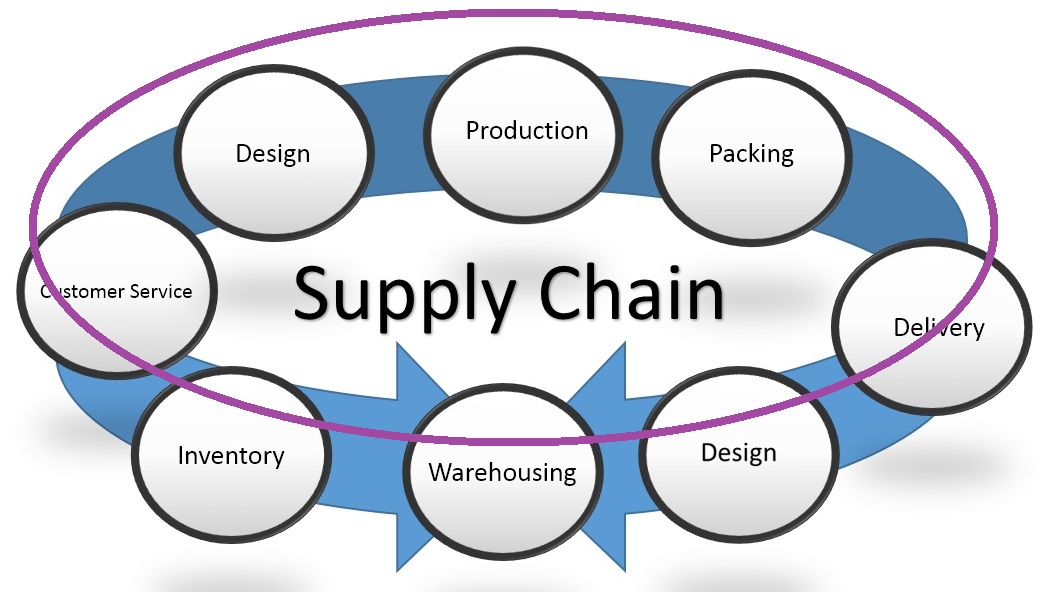
    A supply chain is a global network used to deliver products and services from raw materials to end customers through an engineered flow of information, physical distribution, and cash.

    Basic supply chain for a product
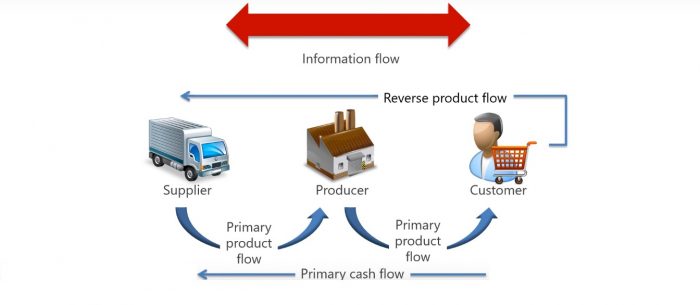
    supply chain information flow

    The figure here illustrates a very basic supply chain with three entities, a producer with one supplier and one customer for basic flows that connect the supply chain entities together are as follows – flow of physical materials and services from suppliers to the end customer, flow of cash from the customer to the raw materials supplier, flow of information back and forth along the chain and reverse flow of product returned.

    Elements of Basic Supply Chain

    A basic supply chain in this figure is made up of these entities.

    • Seller is a supplier who provides goods and services or a person or organization with whom the buyer does business, their generic term in marketplace is sailor.
    • Supplier provides materials, energy, services or components for a product or service such as plastic, fabric, electric, wiring or aircraft.
    • Producer is the one who receives components from the seller to produce a finished good or service such as shirts from fabric, crockery from plastic, power from electric wiring or provides transportation through aircraft.

    The customer is the one who receives the finished product that is the one who wears those shirts uses the crockery turns on the lights or flies in an aeroplane.

    Supply Chain Strategies

    There are three types of supply chain strategies stable, reactive and efficient reactive.

    • Stable Supply Chain Strategy is appropriate for chains that are focused on execution, efficiencies and cost performance. they use simple connectivity technologies and have little need for real-time information for example table salt manufacturer uses scaled production and dedicated capital assets.
    • Reactive Supply chain Strategy works well when the chain acts to fulfill demand from trade partners, for example manufacturer a sports team apparel for fans. when it seemed makes it to the next round more products are needed however for the losing team demand virtually disappears.
    • Efficient Reactive Supply Chain Strategy focuses on the efficiency and cost management on the total delivered cost of finished goods, for example in supermarket chains distribution centers, logistics providers and manufacturers cooperate to replace the goods sold in the shops within less than 24 hours.

    Flows in Supply Chains

    There are four flows in supply chains.

    • Information flow includes invoices, sales literature, specifications, receipts, orders and rules and regulations.
    • Primary cash flow includes payments of products and supplies.
    • Primary product flow includes materials, components, supplies, services, and finished products.
    • Reverse product flow includes returns for repair, replacements, recycling, and disposals.

    Supply-chain Examples

    Consider a supply chain model of a bakery who sells a variety of cakes and this Baker is one end of a supply chain in this case a supplier is a wholesale food distributor that provides ingredients such as flour cream and sugar. the bakery is the producer who turns those ingredients into a variety of cakes. the bakery is operated by an owner who is the retailer and who sells these cakes to the customer.

    Supply Chain in Manufacturing

    Consider a complex manufacturing supply chain model that appears in corporate supply chains. in this model, you will notice the second tier of suppliers and more distribution centers and customers. these suppliers supply materials as well as services. you put the manufacturing at the center and suppliers of components to the immediate left the Tier one suppliers have their own suppliers in tier two, for example, tire one supplier might be a wholesale food distributor that purchases flour from it’s own supplier.

    This supply chain for flour starts from farmers wheat field which is supplied to the food distributor processed in a plant shipped to wholesalers and distribute it to the stores. no matter how far you travel toward the left, you will never run out of new tiers of suppliers. primary product flows from left to right and primary cash flows from right to left.

    Supply Chain in Services

    initially the supply chain model was developed for manufacturing but the service industry has supply chains too. a few examples of services industries our electricity provider, legal adviser, real estate, construction, software house, and even federal government. in its broadest sense service industries include all organizations except farming, mining, and manufacturing. below exhibit illustrates the supply chain of an electric utility it receives products services and supplies and dispenses its services to home customers, commercial customers and to other utilities.

    Types of Supply Chain

    • Vertical supply chain management
    • Horizontal supply chain management

    Firms generally pursue one of the two types of supply chain management vertical integration and lateral or horizontal integration.

    Vertical supply chain management

    it is an arrangement in which the supply chain of a company is owned by that company. usually, each member of the supply chain produces a different product or market specific service and the products combine to satisfy a common need. this structure still persists in some companies. vertical integration enterprise may grow from an entrepreneurial base by adding departments and layers of management or through mergers and acquisitions for example in an attempt to create a self-sufficient enterprise, Ford owned iron ore mines steel mills, a fleet of ships, manufacturing plants and showrooms that built and distributed the Ford cars.

    Horizontal supply chain management

    it is an expanding of a business by acquiring a similar company in the same industry. it is contrasted with vertical integration where company produces different items which are related to one product. the company may do this via internal expansion, acquisition or merger. the process can lead to monopolies if a company captures the vast majority of the market for that good or service, for example, a company that manufactures shampoo may add other brands to appeal to a wider customer base.

    Benefits of vertical integration

    Its primary advantage is controlling no dependency for components or services. operations can be synchronized with other company functions.

    Benefits of lateral integration

    They achieve economies of scale and scope they focus entirely on particular business so develop more expertise and they know their market well.

    Differences between vertical and lateral integration

    when a company wishes to grow through a vertical integration it is seeking to strengthen its supply chain reduce its production costs capture upstream or downstream profits or access downstream distribution channels. however, when a company wishes to grow through a horizontal integration it is seeking to increase its size, diversify its product or service, achieve economies of scale, reduce competition or gain access to new customers of the same market.

    Stages of supply chain management evolution

    • Multiple Dysfunction
    • Semi functional Enterprise
    • Integrated enterprise
    • Extended enterprise

    The advances in supply chain management are reflected in each supply chains development, there are typically four or five sequential stages globally and within organizations starting from state zero to four they are stable, multiple dysfunction, semi-functional Enterprise, integrated enterprise, and extended enterprise. every organization falls somewhere within these five stages. some companies shelter from changes so they are less advanced some took advantages of changes and some organizations to believe that they are in the most advanced stage.

    1. Multiple Dysfunction

    the nucleus organization lacks internal definition in goals there are no external connections other than a few transaction links. below exhibit illustrates the lack of coordinated flows of information or solid relationships among potential partners such organizations have unplanned activities, more threats, less forecasting, demand and supply issues, and poor payment flows.

    2. Semi functional Enterprise

    at this stage nucleus organization begins to improve effectiveness, efficiency and quality within functional areas as explained in a below exhibit information flow has been improved and functional areas have been defined, however, departments perform their functions one after the other. there is no collaboration between various departments and no partnership formed with customers and suppliers.

    3. Integrated enterprise

    these organizations are fully integrated between departments using enterprise resource planning or ERP. this is a preload to end-to-end supply chain management as explained in below exhibit, individual firm begins to focus on business processes rather than compartmentalized functions. corporate wall links supply chain partners together.

    4. Extended enterprise

    the firm integrates its internal network with the internal networks of supply chain partners in order to improve efficiencies product or service quality or both, exhibit shows the advancement this structure allows complete sharing of information across integrated networks and team building and planning across corporate boundaries.

    What is supply chain management

    Supply chain management is the management of the flow of goods and services, it includes the movement and storage of raw materials, work-in-process, inventory, and finished goods from point of origin to point of consumption. every product that reaches an end user represents the cumulative effort of multiple organizations some organizations have only paid attention to what was happening within their four walls while some did not but the entire chain of activities ultimately delivered products to the final customer, the result was disjointed and often ineffective supply chain.
  • What is EDI Meaning | Electronic Data Interchange Definition

    What is EDI Meaning | Electronic Data Interchange Definition

    Tech Turf is Presenting here the article to tell the basic understanding of EDI. Electronic data interchange (EDI) is the latest technology by which you will be able to send your important documents from one computer to another in a secure way. Here, we are providing complete information about the basics of electronic data interchange that will be useful for you to understand it in a better way.

    What is EDI Meaning?

    The Simple definition of EDI is as follows,” the interchange of electronic documents in a standard format from one electronic device to another in a secure way is called EDI.

    Previously, the business documents were exchanged through paper-based format but now in the modern era the business documents are exchanged electronically from one computer to another and there are many benefits of doing that. there are many advantages of using EDI in organizations such as a reduction in cost, increase of processing speed, reduction in errors, improvement in security etc.

    Electronic Data Interchange Definition -2

    Electronic data interchange is the exchange of electronic files in a standard format that is easily process-able by a computer so that the exchange can be automated without any human intervention.

    Complete List of EDI Articles

    Factorization of EDI Basics & Elements

    Following is the complete meaning of EDI definition elements that will help you to understand the EDI more better.

    What is meant by “One Electronic Device to another”?

    EDI is the new era of technology, It had replaced the old technique such as postal services, email, fax etc. as we all know that the email is also a digital method to send the documents but it does not come under EDI because it is handled by human rather than electronic devices such as computer. when the human intervention comes in any process, it make the process very slow and less secure, it also includes many errors in the process.

    But, If you talk about EDI documents, it directly goes to the receiver’s electronic device and the processing of the information done by the computer itself in a very quick way.

    You will be able to understand the difference between the manual process and EDI process for the interchange of a document by following images easily.

    Manual Document Exchange
    Manual Document Exchange


    EDI Document Exchange
    EDI Document Exchange

    What is business document in EDI?

    These are any normal kind of document that is usually exchanged between one business to another. Purchase orders, ship notices and business invoices are the most conman examples of electronic data interchange documents. But there are many another kind of documents that are sent over EDI network such as billing documents, logistics and inventory documents, business proposals etc.

    What is meant by Business partner in EDI?

    In EDI Process, there are two ends, one is the sender and other is a receiver. These ends are mostly two different companies or organizations that are exchanging their important document with each other through edi. these companies are termed as trading or business partners.

    What is meant by Documents Standard format in EDI?

    In the process of electronic data interchange, the documents are processed through electronic devices such as a computer. the document sent over the edi network must have a defined format so that the electronic devices could be able to read and understand it. You can assume the standard format as the defined place for every unit in the document. A standard format of EDI documents defines the format of a document such as decimal, integer, mmddyy, language etc. It also describes each part of the information contained it in the document. if different edi document formats are used in the edi process then it would not be understood by another computer. It would create a situation as a french speaking man is trying to understand an English document.

    • EDI Document formats: Now a days, many EDI formats are in tradition such as ODETTE, VDA, EDIFACT, ANSI, TRADACOMS, ebXML, HL7 etc. there are many different kinds or versions of every EDI standard i.e. ANSI ASC X12, EDIFACT version D12, ANSI 5010. To exchange the documents over edi network, the sender and receiver end of computers must use the same edi standard version.
    • Use of EDI Translator: Many organizations use EDI translator, it is used to translate the electronic data interchange format in the internal application format of organization so that the organization computer can understand the EDI document and start processing it immediately. Organizations use the EDI translator as an in house software application or they take help from EDI services providers.
Advertisement