
Anvil
Private & Offline AI on your iPhone: chat, voice, notes and images


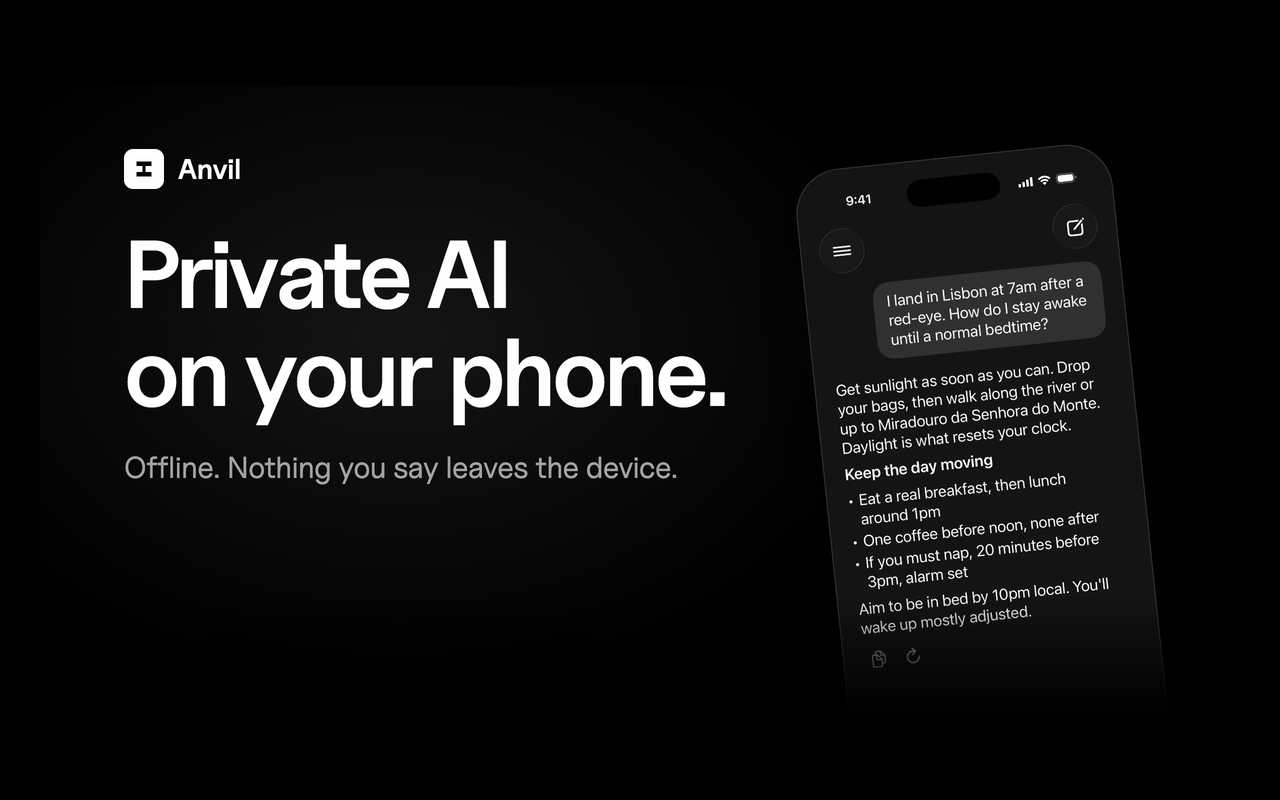
I built Anvil because I wanted an AI assistant that keeps my conversations on my own phone. Chat runs Gemma 4 E2B on the iPhone through LiteRT LM. Anvil Core downloads once over WiFi, and after that the app works in Airplane Mode.
It reads and translates signs and menus offline, which is handy when you travel, and it keeps chat, voice, notes, tasks, photos and documents in one app. Anvil Dream is an optional download that makes 1024x1024 images on the Neural Engine. No account is needed, and web search and iCloud backup are optional.
It needs an iPhone 15 Pro or newer. Anvil is in a free public beta on TestFlight, and every TestFlight tester gets Anvil Pro free: https://testflight.apple.com/join/5JGCZpxt
Select tools to compare (max 3):
| Feature |
Anvil ★
|
|---|---|
| Pricing Model | Free + Paid |
| Starting Price | Free |
| Free Tier | ✓ Yes |
| Verified Listing | ✕ No |
| Category | Productivity |
| Platform | iOS |
| Visit | Open → |
💡 Data sourced from tool listings and user reviews. Visit each tool's official website for the latest details. See all 5 alternatives →
Discover what your tool can do for you
- 5 daily credits
- Public projects
- Unlimited collaborators
Designed for fast-moving teams building in real time
- 100 monthly credits
- 5 daily credits (up to 150/mo)
- Usage-based Cloud + AI
- Credit rollovers




Not sure Anvil is right for you? Browse the best alternatives in the Productivity category — compare features, pricing, and reviews.




Looking for alternatives to Anvil?
Explore 5 similar tools in the Productivity category
